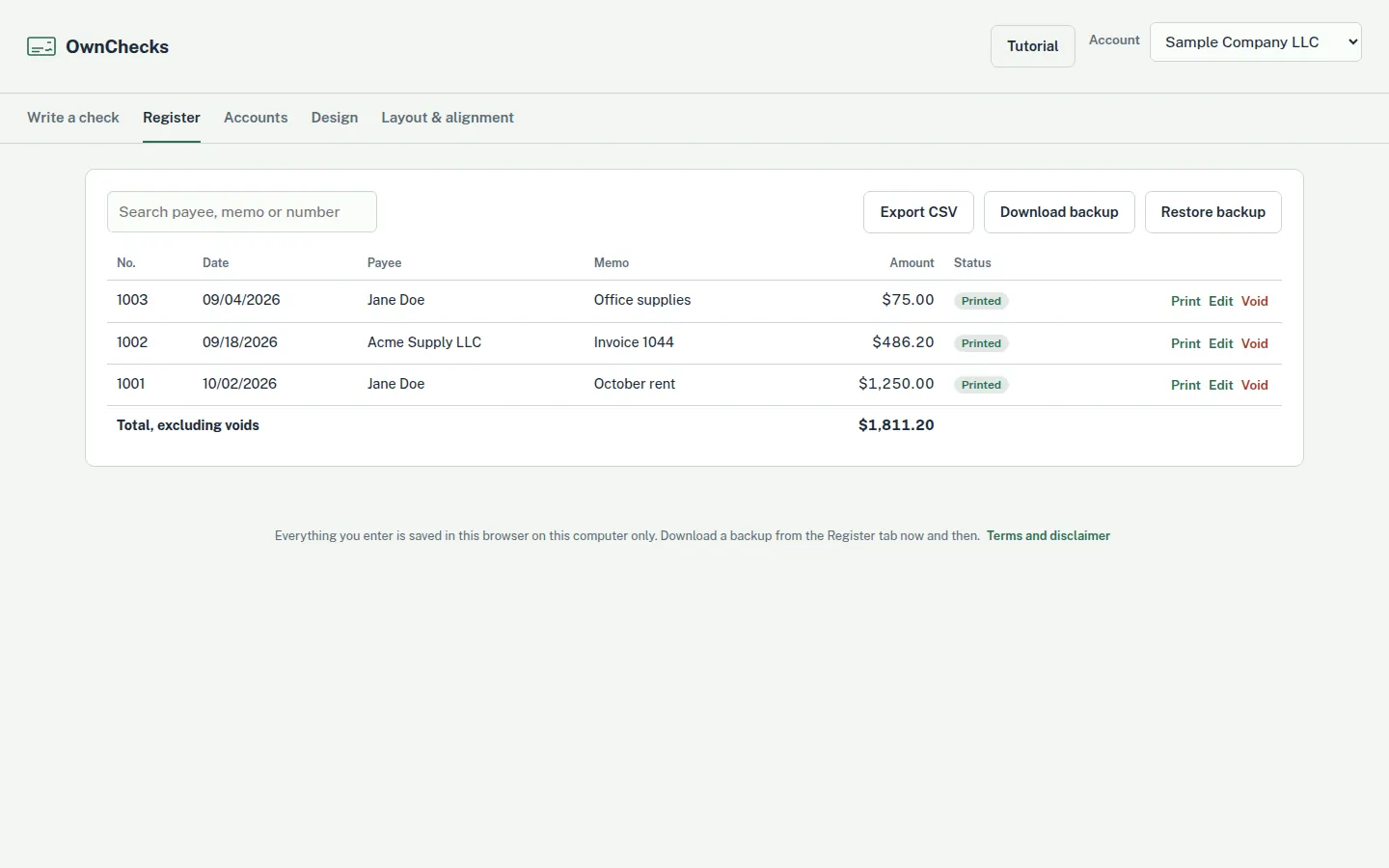
What the register screen shows
The Register tab lists the checks for the account you have selected. Each row has the check number, the date, the payee, the memo, the amount, and a status of Printed or Void. A search box filters that list by payee, memo, or number. If nothing matches, the table says no checks match that search. If you have not recorded a check for that account yet, it tells you to print one from the Write a check tab.
The footer adds the amounts and labels the sum “Total, excluding voids.” A voided row is struck through and left out of that total. The screenshot on this page is that screen, filled with sample checks: Jane Doe for $1,250.00, check 1001, dated 10/02/2026, and Acme Supply LLC. The figures are sample data, and a SAMPLE – VOID mark crosses the screen. It is not a picture of a customer’s register, and the routing and account numbers on the public samples are zeros.
The list is sorted with the highest check number first. Switching accounts switches the list. The operating account and a second account you are allowed to sign each keep their own rows. “Account” here means the bank account in the app, not an OwnChecks login. There is no account to create.
Void, edit, and print again
Void asks you to confirm, then marks the row Void. The number stays on the list so you can see that it was used. Restore, on a voided row, sets the status back to Printed and puts the amount back into the total. That restore is the opposite of void. It does not mean “restore a backup.”
Edit loads that check’s number, date, payee, amount, memo, and address into the Write a check form. The app tells you to change the number if you are printing the edited check on a new piece of paper. Print, on a row that is not void, sends that same check to the printer again. A voided row does not offer Print.
If you try to print a number that is already in the register for that account and is not void, the app asks before it prints again. That warning is about a duplicate number on this computer. It is not a lock that talks to the bank, and it cannot pull a sheet out of a mailbox.
CSV, backup, and restore
Export CSV writes a file for the current account. The columns are check number, date, payee, amount, memo, and status. You can open that file in a spreadsheet later, or hand it to a bookkeeper. The export is a copy of the list. It is not a live feed, and editing the spreadsheet does not change the register.
Download backup saves the local file, including the accounts and the register, onto your computer. Restore backup asks you to confirm, then replaces what is currently in the app with that file. The backup is yours to store. Your checks, payees and register stay on your PC. Nothing is uploaded. It needs the internet only to download it and to activate your key once. Your check data never leaves your PC. Clearing the browser data on that PC can erase the register. A backup you already downloaded is the copy that survives that.
Two computers do not share a live register. A second computer is $15. You would restore a backup onto it only if you choose to move the file. If both computers print, the two lists can drift apart. There is no multi-user portal and no cloud account holding the rows.
What this register is not
The app says its check register is not an official bank record, and that you should reconcile it against your bank statements. It does not download cleared checks. It does not mark a row when the bank pays it. It does not produce a reconciliation report. A total that skips voids is not a bank balance.
It does not connect to QuickBooks, and it does not push the register into an accounting program. It does not do payroll, invoices, inventory, or sales tax. If the job is a full set of books, this is the wrong tool. If the job is “what check number did we use for the lumber yard,” the register is the list. The small-business page says the same limit in the context of a shop.
It also does not print checks from Excel. The CSV leaves the app. A workbook does not come back in as a batch. People searching for check register software sometimes want a ledger that imports a spreadsheet or a bank download. This screen does neither. The print-your-own page is about the paper. This page is about the list after the paper exists.
How a check gets onto the list
You write the check on the Write a check tab. Recording it adds the row and moves to the next check number. The register does not invent payees. You typed them, or you picked one you had already saved on that PC. The memo is free text, which is why a job name or an invoice number is what the search will find later.
Trial checks print with a VOID watermark until you activate a license. The register still records them. Use that to learn the screen before a live check. Print a free test page to check alignment. Confirm acceptance with your bank before you rely on a check. A test page does not prove bank acceptance. OwnChecks is not affiliated with any bank, and it does not move money. MICR toner is recommended when you print the MICR line yourself. The test page checks alignment. It does not tell you the register matches the bank.
$50 for your first computer. Add more for $15 each, up to 10 per buyer (per purchase email). Future versions are included for as long as we sell it. Email support only, support@ownchecks.com. The steps for a business check, including filing it in the register, are in how to print business checks.
Buy OwnChecks
$50 for your first computer. Add more for $15 each, up to 10 per buyer (per purchase email). The register in the screenshot uses sample data and a SAMPLE – VOID mark.
Card, Apple Pay, Google Pay
Refunds within 48 hours of purchase by contacting support@ownchecks.com. After 48 hours, all sales are final. Try the free trial first. Checks print with a VOID watermark until you activate.
Related
Questions
Is this bank reconciliation software?
No. The register lists checks this app printed. It does not download cleared checks, and it does not mark a row when the bank pays it. The app says the register is not an official bank record. Reconcile it against your bank statement yourself.
Can I print checks from Excel?
No. You can export the register to CSV and open that file in a spreadsheet. OwnChecks does not print a batch from Excel, and it does not import a workbook.
Does the register connect to QuickBooks?
No. There is no accounting-software connection. If the books live somewhere else, the CSV is the handoff. OwnChecks does not push the register into another program.
What can I search for?
The search box filters the current account by payee, memo, or check number. If nothing matches, the table says so.
Will my bank accept a check I print?
Print a free test page to check alignment. Confirm acceptance with your bank before you rely on a check. A test page does not prove bank acceptance. OwnChecks is not affiliated with any bank, and it does not move money.
Does OwnChecks run on a Mac?
No. It is Windows only. Windows 10 or 11 (64-bit). Internet is needed to download and activate once.. Mac and Linux are not supported.