What “print your own” includes
A business check is a promise from an account you control. Printing it yourself does not create the account, and it does not make the promise more official than the bank’s rules. It means you are not waiting on a mail-order check printer for every payee. You keep stock in a drawer, you open the app, you print one check or a short run, and you record it.
OwnChecks is built for that job on Windows. You add each account you are authorized to sign on: the name that should appear, the address, the bank name, the routing number, and the account number. You add payees so you are not retyping them. The next check number lives with the account, so the stack stays in order.
Two paper paths are supported. Blank check stock receives the whole face, including a MICR line in the original E-13B font. Pre-printed stock already has the bank and the numbers, and the app fills the fields that are still open. You pick the path per account. Mixing them up is how checks print on the wrong line, which is why the alignment test exists.
What you still buy besides the software
$50 for your first computer. Add more for $15 each, up to 10 per buyer (per purchase email). Future versions are included for as long as we sell it. The software price is not a box of checks. Blank stock, security paper if you want it, and MICR toner or MICR ink are separate. A laser printer is recommended when you are printing the MICR line. Pre-printed stock from a check printer skips the MICR toner, because the line is already on the paper.
The free trial is the way to find out whether your printer and your stock line up before you pay. Trial checks carry a VOID / TRIAL watermark. Print a free test page to check alignment. Do not hand a trial page to a vendor. Print a free test page to check alignment. Confirm acceptance with your bank before you rely on a check. A test page does not prove bank acceptance. OwnChecks is not affiliated with any bank, and it does not move money.
Logo and signature are optional and local. A PNG with a transparent background is the better logo file. You drag it on the preview or type a position. The same is true of the signature. Neither file is uploaded. It needs the internet only to download it and to activate your key once. Your check data never leaves your PC.
The register that stays with the checks
After a check prints, it can go into the register on that computer. You can search by payee, memo, or number, void a check, edit a row and print again, export CSV, and download a backup. Restore puts that file back on the same kind of local copy. There is no cloud account holding the register, and there is no multi-user portal.
That register is a record of what this app printed. The app itself says it is not an official bank record. Reconcile it against the bank statement. It does not download cleared checks, and it does not connect to QuickBooks. If the job is job-cost accounting, this is the wrong tool. If the job is “what check number did we use for the lumber yard,” the register is the list.
A second office PC is $15 more. The key from an order activates on the computers that order paid for. The checks do not follow the license over the network. You would restore a backup only if you choose to move the file yourself.
Who should not print their own
Do not print checks on an account you are not allowed to sign. Do not print them for someone else as a service. OwnChecks is not a check-printing bureau and it does not move money. If your bank has told you it will not accept desktop MICR, believe the bank. The software will still print a page. Acceptance is not a software setting.
Also skip this if the computer is a Mac, if you need the checks mailed for you, or if you need the payee list in a browser for a team that is never in the same room. Those are different products. The Checkeeper comparison is the monthly cloud version of that choice. The VersaCheck comparison is the print-credit version.
If the fit is a Windows PC, a drawer of stock, and a one-time license, start with the trial and the test page. Pay $50 for the first computer when the alignment is right and the bank has answered you. Updates after that are included for as long as we sell it. Your license includes all future versions of OwnChecks released while we continue to sell the product. We may stop selling or updating it at any time; your installed version keeps working.
Buy OwnChecks
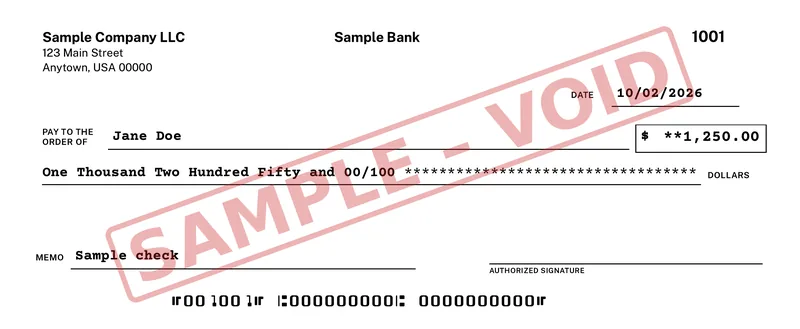
$50 for your first computer. Add more for $15 each, up to 10 per buyer (per purchase email). The sample check on this page uses sample data and a SAMPLE – VOID mark.
Card, Apple Pay, Google Pay
Refunds within 48 hours of purchase by contacting support@ownchecks.com. After 48 hours, all sales are final. Try the free trial first. Checks print with a VOID watermark until you activate.
Related
Questions
Can I print business checks myself?
Yes, if you are allowed to sign on the account. OwnChecks prints the check. Your bank decides whether to accept it. Print a free test page to check alignment. Confirm acceptance with your bank before you rely on a check. A test page does not prove bank acceptance. OwnChecks is not affiliated with any bank, and it does not move money.
Do I have to use blank stock?
No. You can print on blank check stock, which needs a MICR line and MICR toner, or on pre-printed stock that already has the bank line. The app has presets for pre-printed layouts.
Where is the list of checks I printed?
Your checks, payees and register stay on your PC. Nothing is uploaded. The register on that PC lists them. You can export a CSV and download a backup.
Does OwnChecks run on a Mac?
No. It is Windows only. Windows 10 or 11 (64-bit). Internet is needed to download and activate once.. Mac and Linux are not supported.