Best check printing software for Windows: $50 once, no subscription
OwnChecks is $50 for the first computer, with no monthly fee and no print credits. This page compares it with Checkeeper, VersaCheck, Checksoft, and ezCheckPrinting. Checkeeper’s price is as of Oct 21, 2026 on its pricing page. Other competitor prices as of Oct 2, 2026 are on the VersaCheck Silver bundle, Staples, and ezCheckPrinting’s pricing page, and on the comparison. If a capture did not show a dollar amount, this page says Not stated. OwnChecks publishes this comparison. It is not a neutral lab test.
Password protected and encrypted
Windows only Windows 10 or 11 (64-bit). Internet is needed to download and activate once.
Short answer
Short answer
For a small business or household on a Windows PC, we think the best check printing software is the kind you pay for once. OwnChecks is $50 for the first computer and $25 for each extra one in the same order. There is no subscription, no print credits and no per-check fee. It prints complete checks on blank stock, MICR line included, in the standard E-13B font. It imports CSV, QuickBooks Desktop IIF and Quicken QIF files and prints the whole batch at once. Your register stays on your PC.
A regular printer works fine. Most banks accept these. Print a free test page and ask your bank before you rely on it.
- Windows, one payment with free updates, no print credits: OwnChecks, $50 once. Download the free trial or buy it.
- A browser app or check mailing: Checkeeper, $14.99 a month on its pricing page as of Oct 21, 2026.
- A Mac: VersaCheck and ezCheckPrinting sell Mac editions (as of Oct 2, 2026). OwnChecks is Windows only.
- The lowest shelf price: Checksoft Personal Deluxe, $41.99 at Staples on Oct 2, 2026. Its policy for later versions is Not stated.
How this comparison is scored
A “best” list that hides the meter is not useful. What changes the bill is the first price, whether a later version is another purchase, whether each check spends a credit, and whether the payee list lives on your PC. OwnChecks is Windows only. A Mac requirement ends the comparison before price does.
OwnChecks
$50 for your first computer. Add more in the same order for $25 each, up to 10 per buyer (per purchase email). Free updates (details).
Your checks, payees and register stay on your PC. Nothing is uploaded unless you choose optional Mail-a-check, which sends that one check's print file securely to OwnChecks for printing and mailing. It needs the internet only to download it, to activate your key once, and for optional Mail-a-check. Your bank details stay on your PC unless you choose to have a check mailed. You can print a MICR line on blank check stock in the standard E-13B font, or use a preset for pre-printed stock. Import a CSV, QuickBooks Desktop IIF or Quicken QIF file and print the whole run at once. Set up recurring checks, duplicate last month’s rent check in one click, and export an issued-checks CSV for your bank’s Positive Pay upload. The register records every check you print, with CSV export and backup. Your data file is encrypted on your computer, a PIN lock asks for the code before the app opens (see security), and an activity log records what was printed.
The tradeoffs are real. There is no Mac version and no Linux version. The app mails a check only if you choose optional Mail-a-check ($5 a check). It imports QuickBooks and Quicken files, but it does not sync live with QuickBooks or any other accounting software. You still buy check stock. A regular printer works fine. Most banks accept these.
Checkeeper
Checkeeper is $14.99 a month, $179.88 a year, on its pricing page as of Oct 21, 2026. Optional mailing on that page is $1.50 a check.
- In Checkeeper’s favor: a browser, optional mailing, connections to QuickBooks Online, FreshBooks and Xero, and no Windows-only limit stated on the pricing page.
- In OwnChecks’s favor: one payment, no monthly bill, and the register stays on the PC.
Four months of that monthly price is $59.96, which is already more than $50 for one computer. A year is about $180. Checkeeper’s pricing page states unlimited checks, templates, and bank accounts, and that blank stock is supported.
Checkeeper is a cloud app. That is a real advantage if you want to open it from a browser and if you want them to mail a check for $1.50. It is a real disadvantage if you do not want payees and bank details uploaded. OwnChecks keeps them on your PC. Optional Mail-a-check mails one check for $5.
VersaCheck
On Oct 2, 2026, the VersaCheck X1 Silver bundle showed $99.99. The Gold and Platinum pages from the same capture did not display the software’s dollar price, so those prices are Not stated here. Both of those captures showed 165 print credits included.
- In VersaCheck’s favor: a Mac edition, a QuickBooks edition, and a long retail history.
- In OwnChecks’s favor: no credit balance, and free updates rather than a new edition purchase.
VersaCheck’s desktop product is sold as a yearly edition, and a newer edition is a separate purchase. OwnChecks has no print credits. VersaCheck sells a Mac edition and a QuickBooks edition. OwnChecks has neither. The full grid, with older figures this capture did not reconfirm, is on the comparison page.
Checksoft and ezCheckPrinting
Checksoft Personal Deluxe was $41.99 at Staples on Oct 2, 2026. That is less than $50 for one computer. Office Depot listed the same edition at $49.99. Home & Business was $74.99 at Staples. Premier was Not stated. Whether later Checksoft versions are included is Not stated. A lower sticker is not automatically a lower cost if the next version is another box.
- In Checksoft’s favor: the lowest confirmed one-time shelf price in this set.
- In ezCheckPrinting’s favor: a stated Mac version and a stated MICR blank-stock feature, at $59 for this version.
- In OwnChecks’s favor: later versions while the product is still sold, and no network-user add-on.
ezCheckPrinting’s features and pricing page showed $59 for a single user, $79 for network, and $40 per additional network user. The vendor describes that license as the current version, with free updates inside that version and a paid upgrade for a new major version. The same vendor pages say it prints MICR on blank stock, and that Windows and Mac licenses are sold separately. Virtual Printer and QuickBooks edition prices were Not stated.
The lowest price we found for a one-time license with free updates. Checksoft’s $41.99 is a lower shelf price. ezCheckPrinting’s $59 covers the version you buy.
What “best” should not mean
It should not mean the program a bank has blessed. No product on this page, including OwnChecks, can promise that. Print a free test page to check alignment, then confirm acceptance with your bank. It should not mean the program with the most logos on a grid. This site does not use competitor logos.
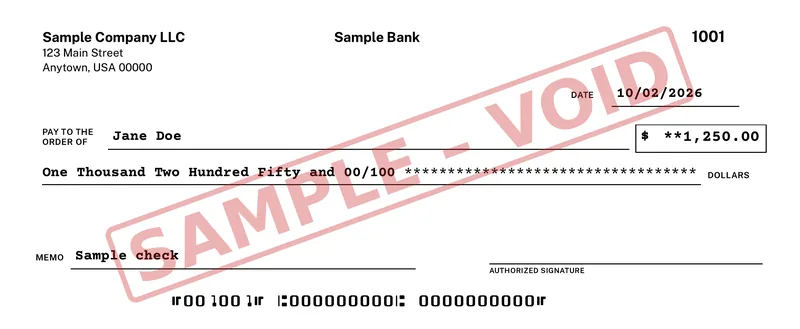
Try OwnChecks on your own printer first. The trial is free and prints with a VOID watermark until you activate.
Pricing
Buy OwnChecks once
$50once
Desktop from $50 once, or Online monthly. Free updates.
- +$25 each extra computer, in the same order
- $5 per check Mail-a-check: we print and mail it by USPS First-Class
- Print unlimited checks, no per-check fee
- Unlimited businesses and bank accounts
Secure checkout by Stripe
Pay with Card, Apple Pay, Google Pay:
$50 for your first computer. Add more in the same order for $25 each, up to 10 per buyer (per purchase email). Free updates. There is no print-credit meter and no monthly fee.
Keep reading
Related
Print a test page, then choose Desktop or Online.
Windows only. It needs the internet only to download it, to activate your key once, and for optional Mail-a-check. Your bank details stay on your PC unless you choose to have a check mailed. Free updates.
Secure checkout by Stripe
Pay with Card, Apple Pay, Google Pay:
- Unlimited businesses and bank accounts
- Pay once or monthly
- Free updates
- Password protected and encrypted
- Desktop works offline (after one-time activation)
Try the free trial first. Checks print with a VOID watermark until you activate.
What is the best check printing software?
There is no single best product for everyone, and we sell OwnChecks, so weigh that. If you want a Windows app you pay for once, with later versions included, no print credits, MICR printing on blank stock, and batch printing from CSV, IIF or QIF files, OwnChecks is $50 once for the first computer. The right pick changes if you need something else. Checkeeper fits someone who wants a cloud app and will pay monthly. VersaCheck sells Mac and QuickBooks editions that OwnChecks does not have. Checksoft Personal Deluxe has a lower shelf price, and its policy for later versions is not stated.
Were these competitor prices checked?
Yes. Checkeeper’s pricing page was checked on Oct 21, 2026: $14.99 a month and $1.50 mailing. The other public pages linked in this article were checked on Oct 2, 2026. Checksoft Personal Deluxe showed $41.99 at Staples and $49.99 at Office Depot. ezCheckPrinting’s features page showed $59, $79, and $40. VersaCheck’s Silver bundle showed $99.99. The Gold and Platinum software dollar prices were not on those captures.
Is there free check printing software?
The OwnChecks trial is free to download. Trial checks print with a VOID watermark until you activate a license, so you can line up your printer and stock before you pay. A license is $50 once, and each key works on 1 computer.
Do I need a special printer?
No. A regular printer works fine. Most banks accept these. Print a free test page to check alignment, then confirm acceptance with your bank.
Does OwnChecks run on a Mac?
No. It is Windows only. Windows 10 or 11 (64-bit). Internet is needed to download and activate once. Mac and Linux are not supported.