What the software is responsible for
MICR is the line of numbers along the bottom of a US check. Banks’ sorters read it. The characters are a specific shape, E-13B, and they are meant to be printed with magnetic ink or toner. OwnChecks places that line from the routing number, the account number, and the check number you entered. It uses the original E-13B font. It does not invent a routing number. You type the one your bank gave you, for an account you are allowed to sign.
The app also prints the rest of a blank-stock check: the business name and address, the bank name, the payee, the amount, the words, the memo, the logo, and the signature. Positions can be moved. An alignment wizard and a test page show you where the printer is putting the line. That is a geometry test. It is not a magnetic test and it is not a promise from a bank.
Print a free test page to check alignment. Confirm acceptance with your bank before you rely on a check. A test page does not prove bank acceptance. OwnChecks is not affiliated with any bank, and it does not move money. If the bank wants a sample, send them a page you are willing to have rejected. Keep the VOID watermark on until you know the alignment is right.
What the software cannot do
It cannot make ordinary office toner magnetic. If you print the E-13B shapes in regular toner, you have printed the shapes. You have not necessarily printed a line a sorter will read. MICR toner or MICR ink is recommended for blank stock. OwnChecks does not sell that toner, and this site does not review toner brands.
It cannot force a branch to accept the check. Policies differ. Some banks are used to desktop checks from their own customers. Some want pre-printed stock from a printer they already know. Ask before you depend on it for payroll or for a large vendor. The toner guide explains when you can skip the line entirely by using pre-printed stock.
It does not move money. Printing a MICR line is not a payment network. The check still has to be deposited or cashed by someone, and the account still has to have the funds. The software is not affiliated with any bank.
How this differs from print-credit MICR
Some desktop programs print MICR and also require a print credit. VersaCheck is the one this site documents that way. On Oct 2, 2026 the Gold and Platinum captures showed 165 credits included and did not show the software dollar price. OwnChecks has no credit balance. The limit is your stock and your license, not a meter.
ezCheckPrinting’s own pages say it prints MICR on blank stock. Their single-user price on the Oct 2, 2026 features page was $59 for the current version, with a paid upgrade when the major version changes. OwnChecks is $50 and includes later versions for as long as we sell it.
Checkeeper’s pricing page says blank stock is supported. That is a cloud app at $14.99 a month. Different place for the data, different bill. The best check printing software page puts the four side by side without scores.
A practical setup
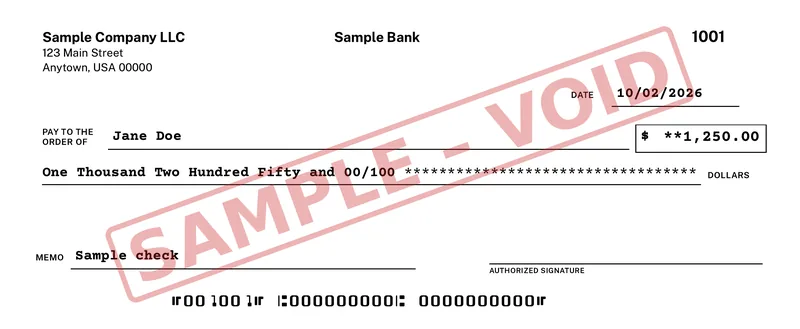
Windows 10 or 11 (64-bit). Internet is needed to download and activate once.. A laser printer is recommended. Buy a small pack of blank check stock before you buy a case. Install the trial. Enter sample-safe practice data if you are only testing alignment, and do not use a live check until the bank has seen a test. The public sample on this site is Sample Company LLC, payable to Jane Doe, with a SAMPLE – VOID mark and all-zero routing and account numbers. Your real check uses your real numbers.
When the test page lines up, order MICR toner if you are staying on blank stock, then activate. $50 for your first computer. Add more for $15 each, up to 10 per buyer (per purchase email). Future versions are included for as long as we sell it. Your checks, payees and register stay on your PC. Nothing is uploaded. If you decide blank stock is more trouble than it is worth, switch the account to a pre-printed preset and stop printing the MICR line. The license is the same either way.
Buy OwnChecks
$50 for your first computer. Add more for $15 each, up to 10 per buyer (per purchase email). MICR toner is recommended. OwnChecks does not sell toner and is not affiliated with any bank.
Card, Apple Pay, Google Pay
Refunds within 48 hours of purchase by contacting support@ownchecks.com. After 48 hours, all sales are final. Try the free trial first. Checks print with a VOID watermark until you activate.
Related
Questions
Does the software include a MICR font?
OwnChecks prints the MICR line in the original E-13B font. The font is in the app. You still need MICR toner or MICR ink if that line has to be magnetic.
Does a successful test page mean the bank will accept it?
Print a free test page to check alignment. Confirm acceptance with your bank before you rely on a check. A test page does not prove bank acceptance. OwnChecks is not affiliated with any bank, and it does not move money.
Can I skip MICR and use pre-printed checks?
Yes. Pre-printed stock already has the bank line. The app fills the remaining fields from a preset. You do not print the MICR line in that mode.
Does OwnChecks run on a Mac?
No. It is Windows only. Windows 10 or 11 (64-bit). Internet is needed to download and activate once.. Mac and Linux are not supported.