Why people use blank stock
Pre-printed checks arrive with your name and account already on them. They are convenient and they are specific. If the account number changes, the leftover box is scrap. Blank stock stays generic until the moment you print, so one drawer can serve more than one account you are authorized to sign. You are also not waiting on a reprint order to change an address.
The cost moves. You buy the paper, and you buy MICR toner if you want the bottom line to be a MICR line. You spend time on alignment. For a business that writes a handful of checks a month to changing payees, that trade is often worth it. For a business that wants the bank’s own stock and nothing else, pre-printed checks are the calmer path, and OwnChecks can fill those in too.
Blank stock is still a controlled supply. Keep it with the same care you would give a box of signed checks, because a sheet plus a printer is enough to produce a check. The software is not a lock on the paper.
What has to be on the page
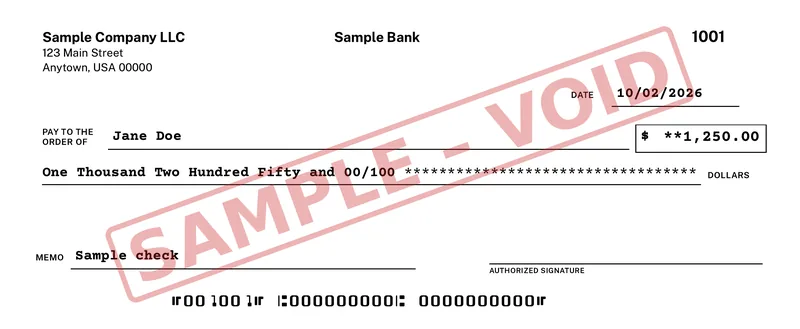
A blank-stock check from OwnChecks can include the business name and address, the bank name, the payee and amount, the legal amount, the memo, the check number, a logo, a signature, and the MICR line. The MICR line is built from the routing number, the account number, and the check number. The font is the original E-13B. You do not install a separate font pack.
The sample printed for this site is Sample Company LLC, payable to Jane Doe for $1,250.00, dated 10/02/2026, check 1001, with a SAMPLE – VOID mark. The MICR line on that sample is all zeros. It is not a usable check. Yours uses your numbers only after you have aligned the printer and talked to the bank.
Field positions are in inches. If the amount sits too high for your stock, move it. If the MICR line sits in the body of the check instead of the clear band at the bottom, move it before you print anything a vendor could deposit. The alignment wizard is there for that pass.
Printer setup
Use a laser printer if you can. MICR toner is made for that kind of printer. Put the toner in before the alignment test, not after, because a different cartridge can change the darkness and sometimes the position. Print at 100 percent scale. Turn off “fit to printable area.” Turn off headers and footers. Print one sheet from the tray you will actually use.
Look at the bottom inch. The MICR characters should sit in the clear band, level, and not clipped. Then look at the payee line and the amount. Folding, mailing, and a teller’s stamp all assume those boxes are where a check usually has them. Print a free test page to check alignment. Confirm acceptance with your bank before you rely on a check. A test page does not prove bank acceptance. OwnChecks is not affiliated with any bank, and it does not move money.
If the geometry will not settle, switch to pre-printed stock rather than forcing a bad line. A pretty check that will not read is not a savings.
After the page looks like a check
Activate OwnChecks when you are done testing. The trial watermark is intentional. A live check should not carry VOID / TRIAL. The license is $50 for the first Windows PC that prints. Extra computers are $15 each. Your checks, payees and register stay on your PC. Nothing is uploaded.
Record the check in the register and back the file up. Blank stock makes it easy to reprint a number. Void a spoiled sheet in the register so the next number stays honest. The software still will not tell you whether the bank posted it. That is the statement’s job.
Buy OwnChecks
$50 for your first computer. Add more for $15 each, up to 10 per buyer (per purchase email). OwnChecks prints that line in the original E-13B font. $50 for your first computer. Add more for $15 each, up to 10 per buyer (per purchase email). Future versions are included for as long as we sell it.
Card, Apple Pay, Google Pay
Refunds within 48 hours of purchase by contacting support@ownchecks.com. After 48 hours, all sales are final. Try the free trial first. Checks print with a VOID watermark until you activate.
Related
Questions
What is blank check stock?
Check paper without your name, bank, or MICR numbers printed on it yet. You print those with software. It is not the same as copy paper.
Do I need special toner?
MICR toner or MICR ink is recommended when the MICR line comes from your printer. Ordinary toner prints the shape. It is not sold as magnetic.
How do I know the alignment is right?
Print a free test page to check alignment. Confirm acceptance with your bank before you rely on a check. A test page does not prove bank acceptance. OwnChecks is not affiliated with any bank, and it does not move money.