A Checkomatic alternative: print your own checks for $50 once
People look for a Checkomatic alternative for two different reasons. Some want a different place to order printed checks. Others want to stop ordering printed checks at all. This page is for the second group. OwnChecks is Windows check printing software you pay for once. Checkomatic figures on this page come from checkomatic.com as of Nov 17, 2026. OwnChecks publishes this page, so weigh that.
Password protected and encrypted
Desktop or Online Desktop: Windows 10 or 11 (64-bit). Online: any computer with a browser.
Short answer
Short answer
Checkomatic is a check printer. It sells printed business, QuickBooks-compatible and personal checks, plus blank check stock, envelopes, deposit slips and stamps. OwnChecks is software. If what you want is to stop reordering printed checks, OwnChecks prints the whole check yourself on blank stock, MICR line included, from a Windows PC. It is $50 once for the first computer, with no monthly fee.
- Checkomatic (checked Nov 17, 2026): printed QuickBooks and computer checks listed from $19.79 on its QuickBooks checks page, and blank laser checks from $34.79 on its blank checks page. Standard production is 3–5 business days plus shipping, per its home page.
- OwnChecks: $50 once, $25 for each extra computer in the same order. Free updates. You buy any blank check stock you like, from any seller.
- They can work together. Checkomatic’s own blank stock listing says software is required to print the checks. OwnChecks is that kind of software.
A check printer and check software are different things
Checkomatic prints checks for you and ships them. You pick a layout, add your bank details and logo, and it prints the box with your account and routing numbers already on every sheet. On Nov 17, 2026 its home page said standard production is 3–5 business days plus shipping. Paid rush options on its QuickBooks checks page were Rush +$29.95 and SuperRush +$54.95. Its blank check page says it has made blank check paper in Monroe, NY since 1997. Pressure-seal stock there is listed in quantities from 100 to 2,500.
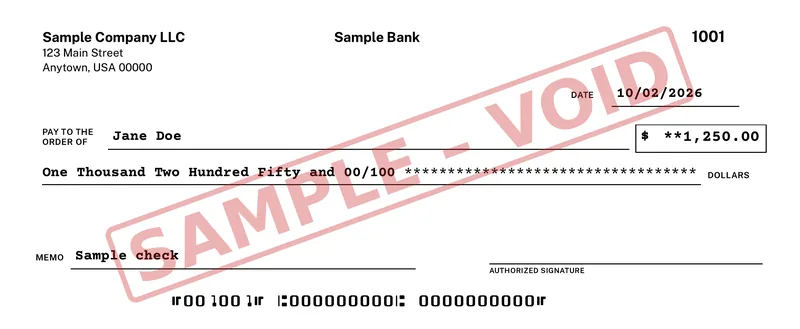
OwnChecks works the other way. The check is printed when you write it. Your business name, bank name, check number and the MICR line in the standard E-13B font go onto blank stock at print time, so there is nothing to reorder when you open a new account or change an address. A regular printer works fine. Most banks accept these.
What it costs each way
Checkomatic’s category pages showed printed QuickBooks and computer checks from $19.79 and blank laser checks from $34.79 on Nov 17, 2026. The quantity behind each starting price is on the product page, so the per-check cost is not stated here. Printed checks are tied to one bank account. A second account means a second order.
- Software: OwnChecks $50 once. We didn't find check printing software for sale on checkomatic.com (checked Nov 17, 2026).
- Paper: blank stock from any seller, or Checkomatic’s own.
- Reorders: none for a new account, a new address or a new logo. You change it in the app.
$50 for your first computer. Add more in the same order for $25 each, up to 10 per buyer (per purchase email). Free updates. You still buy check stock. Blank stock is not tied to an account, so one box covers every account you set up in the app. If you already have pre-printed checks, OwnChecks has a preset for those too, so you are only filling in the fields that are not on the paper.
What OwnChecks does once it is installed
Your checks, payees and register stay on your PC. Nothing is uploaded unless you choose optional Mail-a-check, which sends that one check's print file securely to OwnChecks for printing and mailing. Write one check, or import a CSV, QuickBooks Desktop IIF or Quicken QIF file and print the whole batch. Set up recurring checks, duplicate last month’s check in one click, and keep a register of every check you print with search, void, CSV export and backup. Add your logo and signature. An alignment wizard lines the fields up with your printer.
The free trial prints with a VOID watermark until you activate a license, so you can test your printer and paper before you pay. Optional Mail-a-check is $5 a check if you want one printed and mailed First-Class for you.
Where Checkomatic is still the better pick
Keep ordering from Checkomatic if you write checks by hand from a deskbook, need pressure-seal checks, want matching printed envelopes, deposit slips and endorsement stamps, or simply do not want to print the MICR line yourself. Those are real reasons, and software does not replace them.
Many people end up doing both: buy blank stock from a check supplier and print with software. Start with the pre-printed vs blank check stock guide if you are deciding, or print checks on blank stock for the steps. OwnChecks is not affiliated with any bank, and Checkomatic is a trademark of its owner. OwnChecks is not affiliated with or endorsed by Checkomatic.
Pricing
Buy OwnChecks once
$50once
Desktop from $50 once, or Online monthly. Free updates.
- +$25 each extra computer, in the same order
- $5 per check Mail-a-check: we print and mail it by USPS First-Class
- Print unlimited checks, no per-check fee
- Unlimited businesses and bank accounts
Secure checkout by Stripe
Pay with Card, Apple Pay, Google Pay:
Print your own checks. Pay once.
Keep reading
Related
Print a test page, then choose Desktop or Online.
Desktop: Windows 10 or 11 (64-bit). Online: any computer with a browser. It needs the internet only to download it, to activate your key once, and for optional Mail-a-check. Your bank details stay on your PC unless you choose to have a check mailed. Free updates.
Secure checkout by Stripe
Pay with Card, Apple Pay, Google Pay:
- Unlimited businesses and bank accounts
- Pay once or monthly
- Free updates
- Password protected and encrypted
- Desktop works offline (after one-time activation)
Try the free trial first. Checks print with a VOID watermark until you activate.
What is a good Checkomatic alternative?
It depends on what you want to replace. If you want to keep buying printed checks, another check printer is the alternative. If you want to stop reordering printed checks, check printing software is. OwnChecks is $50 once for one Windows computer and prints the full check, MICR line included, on blank stock.
Is OwnChecks a check printer like Checkomatic?
No. OwnChecks does not sell paper. It is a Windows app that prints checks on your own printer. You buy blank or pre-printed check stock from whoever you like, including Checkomatic.
Can I use Checkomatic blank check stock with OwnChecks?
Yes. Standard blank check stock with the check on top, in the middle or on the bottom works the same way. Print a free test page first. Print a free test page to check alignment, then confirm acceptance with your bank.
Is OwnChecks a one-time price or a subscription?
One-time. $50 for the first computer, $25 for each extra in the same order, up to 10 per buyer (per purchase email). No print credits. Free updates.
Do I need a special printer?
No. A regular printer works fine. Most banks accept these. Print a free test page to check alignment, then confirm acceptance with your bank.
Does OwnChecks run on a Mac?
The Desktop download is Windows only (Windows 10 or 11, 64-bit). OwnChecks Online runs in your browser on Mac, Windows, and Chromebooks.