How to void a check
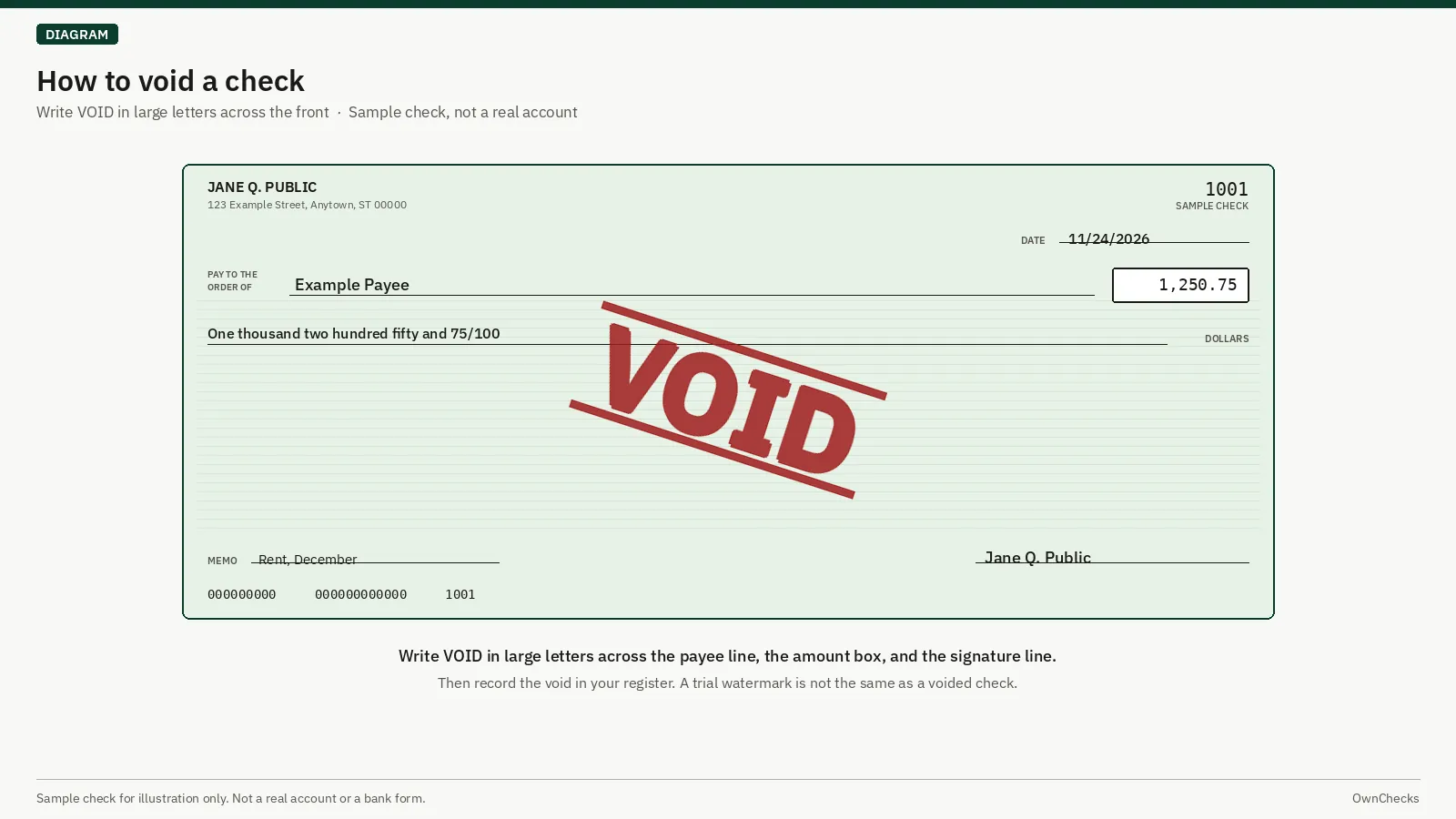
Use a blue or black pen and write **VOID** in large letters across the front of the check. Don't cover the routing and account numbers along the bottom. Then record the check number as void in your register.
Password protected and encrypted
Desktop or Online Desktop: Windows 10 or 11 (64-bit). Online: any computer with a browser.
Short answer
The short answer
Use a blue or black pen and write **VOID** in large letters across the front of the check. Don't cover the routing and account numbers along the bottom. Then record the check number as void in your register.
Steps
This is the usual way to void a paper check.
- **Use a blue or black pen.** Permanent ink, not pencil.
- **Write VOID across the front**, big enough to cover the payee line, the amount box and the signature line. You can also write VOID on each of those lines. Huntington lists both ways.
- **Leave the bottom line clear.** The routing number, account number and check number along the bottom edge are the reason someone asked for a voided check. Don't write over them.
- **Record it.** Write the check number in your register and mark it void, so you're not waiting for it to clear. If that check number ever posts to your account, call your bank.
- **Keep or shred.** If it's going to an employer, send it through their secure channel. Otherwise shred it. A voided check still shows your name, bank and account number.
A voided check for direct deposit
Employers and payroll companies ask for one because it shows your routing and account numbers in a format they can check. Send a voided **blank** check, never a signed or filled-in one.
- A voided deposit slip
- The direct deposit form filled in with your routing and account numbers
- A starter or voided check from your bank, where it offers one
- Setting up direct deposit through online banking or your employer's portal
No paper checks? Ask the employer what they'll accept instead. Chase lists these alternatives:
Voiding doesn't stop payment
If a check you already handed over or mailed is lost, writing VOID on your copy does nothing. The paper is still out there. Ask your bank for a **stop payment**. Under the Uniform Commercial Code, a stop-payment order lasts six months. An oral one lapses after 14 days unless you confirm it in writing, and you can renew it (UCC 4-403). Banks usually charge a fee. Ask yours.
When you'd void a check
Typical reasons:
- You made a mistake filling it out (don't cross out and keep going)
- A direct deposit or automatic payment setup asks for one
- A check was printed with the wrong amount, payee or date
- You're retiring old check stock after you change banks
If you print your own checks
Printing your own adds a second record: the software's register.
**Void the row as well as the paper.** In OwnChecks, Void asks you to confirm, then marks the row Void. The number stays on the list so you can see it was used, it drops out of the "Total, excluding voids," and a voided row can't be printed again. Restore undoes it if you clicked by mistake. More on the check register.
**Reprinting a misprint?** Void the bad one first, then print the replacement with the next number. If you try to reuse a number that's already in the register and not void, the app asks before it prints. That's a warning on your computer, not a hold at the bank.
**Need a voided check for direct deposit and don't have checks?** Ask your employer whether a printed check from your own account, marked VOID, works for them. Many will also take the bank's form instead.
**Trial checks are not voided checks.** The free OwnChecks trial prints a VOID / TRIAL watermark so you can test alignment. It's for lining up your printer, not for giving out your account details.
OwnChecks Desktop runs on Windows 10 or 11 (64-bit), $50 once (+$25 per extra computer in the same order). OwnChecks Online runs in your browser on a Mac, Windows PC or Chromebook. See pricing.
Pricing
Buy OwnChecks once
$50once
Desktop from $50 once, or Online monthly. Free updates.
- +$25 each extra computer, in the same order
- $5 per check Mail-a-check: we print and mail it by USPS First-Class
- Print unlimited checks, no per-check fee
- Unlimited businesses and bank accounts
Secure checkout by Stripe
Pay with Card, Apple Pay, Google Pay:
$50 for your first computer. Add more in the same order for $25 each, up to 10 per buyer (per purchase email). Free updates. OwnChecks Online runs in your browser on a Mac, Windows PC or Chromebook. See pricing.
Keep reading
Related
Print a test page, then choose Desktop or Online.
Desktop: Windows 10 or 11 (64-bit). Online: any computer with a browser. It needs the internet only to download it, to activate your key once, and for optional Mail-a-check. Your bank details stay on your PC unless you choose to have a check mailed. Free updates.
Secure checkout by Stripe
Pay with Card, Apple Pay, Google Pay:
- Unlimited businesses and bank accounts
- Pay once or monthly
- Free updates
- Password protected and encrypted
- Desktop works offline (after one-time activation)
Try the free trial first. Checks print with a VOID watermark until you activate.
What does a voided check mean?
It's a check with VOID written across it so it can't be used for payment. People use one to share their routing and account numbers or to cancel a check they wrote wrong.
Can I void a check that was already cashed?
No. Once it's paid, voiding your copy changes nothing. Check your statement and talk to your bank if it was paid in error.
How do I void a check lost in the mail?
Ask your bank for a stop payment. Writing VOID on a copy doesn't stop the original ([UCC 4-403](https://www.law.cornell.edu/ucc/4/4-403): a stop order lasts six months; an oral one lapses after 14 days unless confirmed in writing).
Can I use a voided check from a closed account?
No. The numbers have to be for the account you want the deposits to go into.
I voided a check in QuickBooks. Is it void?
Only in your books. If the paper went out, it can still be cashed. Get it back, or ask your bank about a stop payment.
Does voiding a check cost anything?
Writing VOID is free. A stop payment usually has a bank fee.